When setting up your OnPay account, you'll see a navigation menu on the left, listing each step of the setup process. You can use this menu to return to previous steps to make changes when needed. If you ever need to step away, or you get interrupted before you’ve finished, that’s fine. Your progress is saved, so you can return to this dashboard at any time by logging back in.
Company Name and Address
Enter the full legal name of your business as it appears in your tax returns.
If your company also does business under a different name, you can add any DBA (Does Business As) names here. This DBA name will appear on worker paychecks.*
*Do not use DBA if operating in Maryland
Pay statements and check stubs in the state of Maryland must include the company's legal name, as registered with the state. Learn more→
Federal Tax Information
Enter your Federal Employer Identification Number (FEIN). If you don’t have one, you can set one up with the IRS in just a few minutes. When you’re ready, you can return to OnPay and finish getting setup.
Company Classification
Find your registered Entity Type in the provided list. Then, tell us your industry. If you don’t see your exact industry, or you do business in a number of industries, just pick the best overall fit for describing your business. If you don't see your entity type in the list, select "LLC". This information is used to customize your experience.
-
943 For Agricultural Employees?
This form is required if you paid wages to one or more farmworkers, and the wages were subject to FICA or federal income tax withholding. Select “yes” to have OnPay file this form for you.
Company Contact Information
Help us get a hold of you if we have questions about your payroll by giving us the number where you can be reached. This number does not have to be the same number used for multi-factor authentication.
Payroll
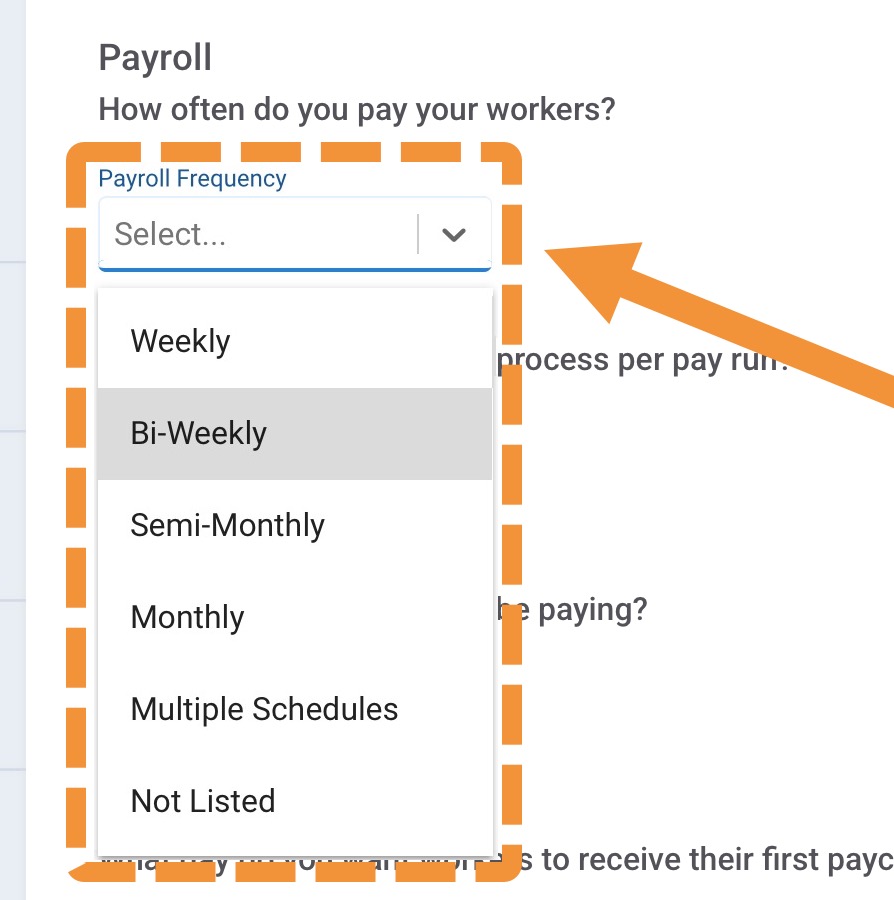 Payroll Frequency
Your payroll frequency determines how often your employees will have a pay day. If you're not sure which pay frequency you'll be using, that's okay. Just pick the most likely. You can change this decision later.
If you select "Multiple Schedules", or "Not Listed", we'll reach out by email to get more detailed information about your pay frequency.
What's the difference between these pay schedules?
-
With a weekly payroll schedule, employees have a pay day on the same day each week, with 52 pay days per year. Below is an example of a weekly schedule, with a payday every Friday.
Pay period: Sunday to Saturday (7 days)
Pay date: The following Friday (known as a one week hold). We always recommend a 5-day hold for employers with hourly employees. It allows time to enter hours and run payroll without being rushed.
-
With a bi-weekly payroll schedule, employees have a pay day on the same day every other week, with 26 pay days per year. Below is an example of a bi-weekly schedule, with a payday every other Friday.
Pay period: 1st Sunday to 1st Saturday plus the 2nd Sunday to 2nd Saturday (14 days)
Pay date: The first Friday after the pay period end date
-
With a semi-monthly payroll schedule, employees have a pay day on the same two days every month with 24 pay days per year. The most common semi-monthly pay schedules have pay days on either the 1st and 15th of a month, or on the 5th and 20th.
First pay period: The 1st through the 15th (15 days)
First pay date: The 20th
Second pay period: The 16th through the end of the month (13-16 days)
Second pay date: The 5th of the following month
Note: Semi-monthly pay schedules can often make a check date fall on a weekend, resulting in the employee not receiving their pay until the following business day.
-
With a monthly payroll schedule, employees have a pay day on the same day every month with 12 pay days per year. For example, here's a typical schedule where the check date is fifth of the following month.
First pay period: The 1st through the end of the month (28-31 days)
Second pay date: The 5th of the following month
Many companies that have mainly salary employees making larger amounts, or companies where the owner is the only employee, choose to use a monthly schedule. It is simply not practical for most regular employees to be paid only once a month.
What's the best pay schedule for your business? What do most companies do? What about in your industry? Here's a breakdown of common pay periods, with pros and cons for each to help you pick the perfect pay period to meet the needs of your business, and your employees.
Payroll Amount
Next, tell us roughly how much in total you'll be paying your employees each pay period. You can always change this later.
Number of Workers
About how many employees and contractors do you pay in a typical pay run? It doesn't have to be exact, just give us an estimate. You can always change this later.
Don't see over 100? Rest assured, can handle big companies, too.
First Check Date
Set a goal for when you want your employees to receive their first check using OnPay. To allow time for our team to get you set up, we recommend choosing a date that is at least one week away. You can change this date later, if needed.
Prior Wages
If your company has already paid wages this year, we'll need you to provide payroll reports for year-to-date wages. The information you provide is used to calculate employee withholdings and deductions, stay within wage bases, and process year-end forms and filings. If you select "Yes", you Account Executive will reach out to help you provide this information.
Click Continue to move to the next step.
Next: Owner or officer information
Next, you'll enter the information of an individual with the authority to sign legal documents on behalf of the company.
v7.25